
This guide is only an example of a proper setup, and some values may change based on your configuration.
Setup Claim Rules on Your SAML Server
Edit Claim Rules
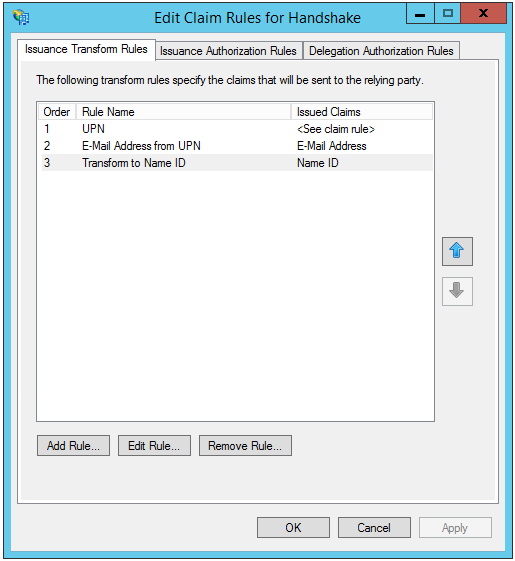
Edit Rule - Transform to Name ID
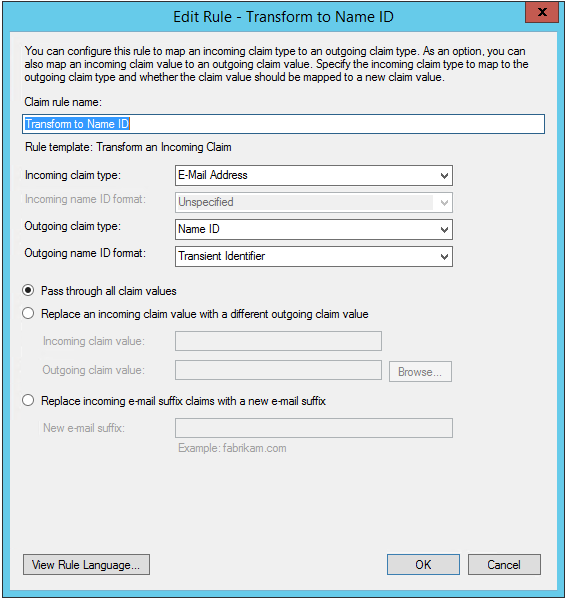
Edit Rule - UPN
![c:[Type == "http://schemas.xmlsoap.org/ws/2005/05/identity/claims/upn"]
=> issue(Type = "urn:oid:1.3.6.1.4.1.5923.1.1.1.6", Value = c.Value, Properties["http://schemas.xmlsoap.org/ws/2005/05/identity/claimproperties/attributename"] = "urn:oasis:names:tc:SAML:2.0:nameid-format:transient");](https://files.readme.io/460e8e0-handshake_claims2.png)
c:[Type == "
http://schemas.xmlsoap.org/ws/2005/05/identity/claims/upn
"]
=> issue(Type = "urn:oid:1.3.6.1.4.1.5923.1.1.1.6", Value = c.Value, Properties["
http://schemas.xmlsoap.org/ws/2005/05/identity/claimproperties/attributename
"] = "urn:oasis:names:tc:SAML:2.0:nameid-format:transient");
Edit Rule - E-mail Address from UPN
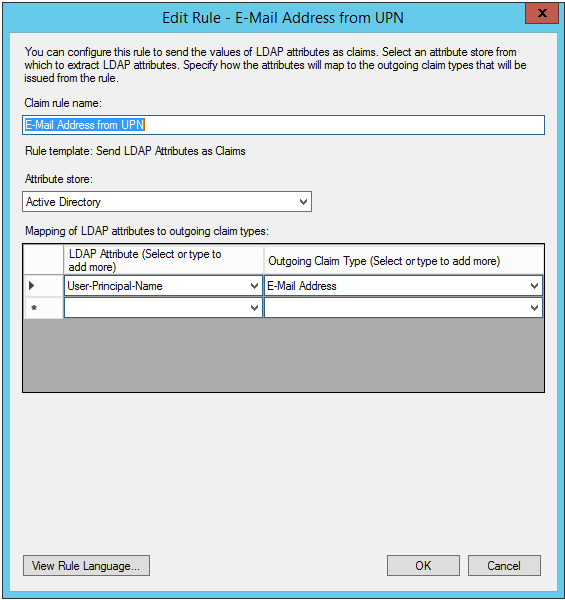
Now go to your Handshake SSO Preferences and specify the matching attribute value:
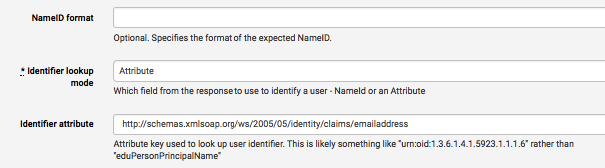
If following our steps above exactly, this will be:
http://schemas.xmlsoap.org/ws/2005/05/identity/claims/emailaddress
Make sure to de-select "Requested authentication context?" before testing as you are using ADFS (This is also found on your Handshake SSO Preferences page)
